SentinelX connects Claude, ChatGPT, Grok and any MCP client to your Linux, macOS and Windows servers. One command per host, Google sign-in, your whole fleet in one dashboard.
An agent on each host. A hub that handles the rest.
The hub handles OAuth, identity and MCP. The agent only connects outbound — no inbound ports, no DNS, no certificates on your host.
Claude · ChatGPT · Grok · Cursor
any MCP client
↓HTTPS + OAuth · Google sign-in
mcp.sentinelx.app
managed hub — OAuth, MCP, dashboard
↓WebSocket · outbound from the agent
sentinelx-cloud-core
open-source agent on your server
Your servers never expose an inbound port to the internet.
01 — INSTALL
One command, one minute
Run the installer. It creates a system user, registers a systemd service, and connects out to the hub.
02 — ENROLL
Sign in with Google
Sign in at mcp.sentinelx.app, click Enroll a new host, paste the token. Your server appears in seconds.
03 — DASHBOARD
See your fleet
Every host with status, version and last-seen. Label, kick sessions, or unenroll — from the browser at mcp.sentinelx.app/dashboard.
04 — USE IT
From any AI client
Add the hub as an MCP connector in Claude, ChatGPT or Grok. The AI targets hosts by name — and only runs what the allowlist permits.
// in practice
Ask in plain language. Watch it work.
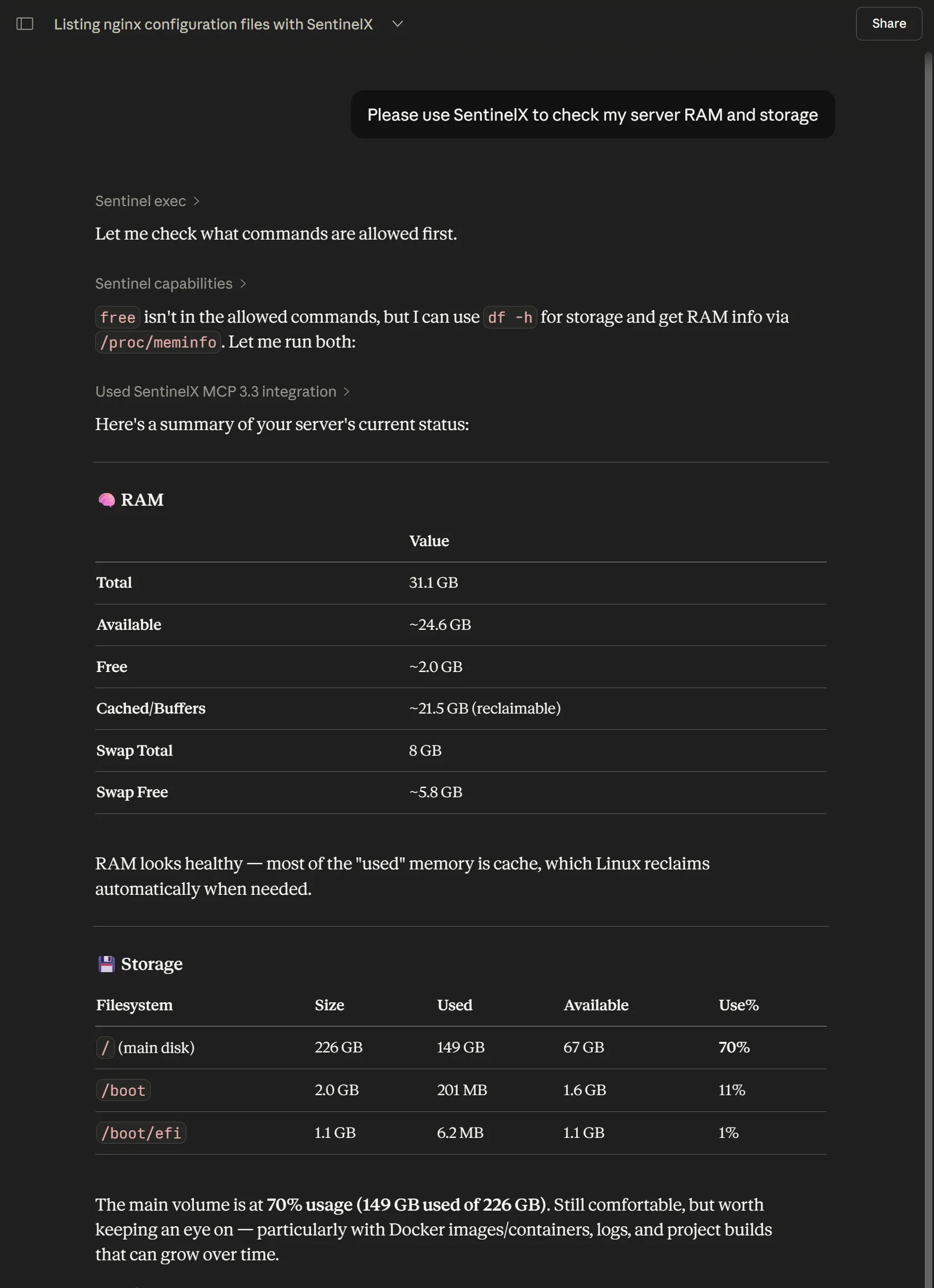
A real session: SentinelX checks the allowlist first, runs only what's permitted (df -h, /proc/meminfo), and reports back — no shell handed over, no guessing.
SentinelX in ChatGPT — checking RAM & storage, live.
// AI clients
Works with any MCP client.
One hub URL, any MCP client. Sign in once with Google — every client you connect sees the same fleet.
1. claude.ai → Settings → Connectors → Add custom connector
2. URL: https://mcp.sentinelx.app/mcp/mcp
3. Sign in with Google when prompted
4. Ask Claude: "list my hosts"
// connect Grok in 30 seconds
1. grok.com/connectors → New Connector → Custom
2. URL: https://mcp.sentinelx.app/mcp/mcp
3. Sign in with Google when prompted
4. Ask Grok: "list my hosts"
Most AI coding tools start every session from zero. SentinelX runs inside your chat, so context and decisions accumulate across days. Add git on the host and the AI actually remembers your project.
01 — REFACTOR OVER DAYS
Iterate on a repo across sessions
Clone once, refactor over a week. Thursday's session remembers what Monday tried.
02 — DEBUG WITH HISTORY
Bugs that need yesterday's context
"Remember the timeout from last week? It came back." The chat holds the thread; the agent re-runs the diagnostics live.
03 — DECISIONS THAT STICK
Architecture rationale stays decided
Why Postgres over SQLite, why the worker is on its own host. The reasoning lives in the conversation, not in comments you'll forget to grep.
// dogfooded
This site was built and is continuously updated with SentinelX.
The agent edits /var/www/sentinelx.pensa.ar/index.html directly, with git tracking every change. Including this paragraph.
// security model
Least privilege, by design.
The agent is open source — audit exactly what runs on your server.
🔒
Command allowlist
Only commands explicitly listed in the policy run. Paths and arguments are validated too.
👤
Isolated service user
A dedicated sentinelx user, no login shell, sudo scoped to exactly what the policy permits.
🎟
OAuth via Google
Google sign-in, JWT sessions with explicit scopes. The agent only trusts the hub.
🔑
Outbound only
One outbound WebSocket. No inbound ports, no public DNS, no certificates. Your firewall stays closed.
The agent is Apache 2.0-licensed and lives at pensados/sentinelx-cloud-core. Read it, fork it, run a fork — it's yours.
// editor & CLI clients
Drop-in config for JSON-based clients.
Same hub URL, one paste. The only thing that changes per client is the top-level key and how the transport field is spelled — get that wrong and the client silently falls back to the legacy SSE transport.
url only — Cursor auto-detects transport and handles OAuth. Heads-up: Cursor caps ~40 active tools and SentinelX exposes 38, so disable tools you don't use or trim other servers.
Most clients use mcpServers + url. A few differ — check your client's docs for the transport key (e.g. type or serverUrl).
Android Studio — known issue. Its built-in MCP client has a PKCE bug (the code_verifier doesn't match its own code_challenge), so the OAuth handshake fails on the client side. Nothing to fix server-side — use VS Code or another client until JetBrains ships a fix.
Windsurf — known issue. Windsurf's MCP client validates the OAuth issuer in the wrong place (it expects it in the token response body instead of the RFC 9207 callback parameter it already receives), so the token exchange fails on the client side. The config is correct — it'll connect once Windsurf ships the upstream fix (rust-sdk#896). Use Cursor or VS Code in the meantime.
// one URL for every client https://mcp.sentinelx.app/mcp/mcp — sign in with Google on first connect.
// self-hosted alternative
Want to run your own hub?
Prefer running the whole stack yourself, OAuth included? The Docker edition bundles agent, MCP bridge and Keycloak. Same protocol, same security model.
SentinelX Docker self-hosted
One-line install, 4 containers on your own host. You bring DNS, certificates and ops. For full data sovereignty or air-gapped setups.